
Pipeline and leads
Stages are yours to name, color, and order, including which ones are final. The board updates for everyone looking at it.
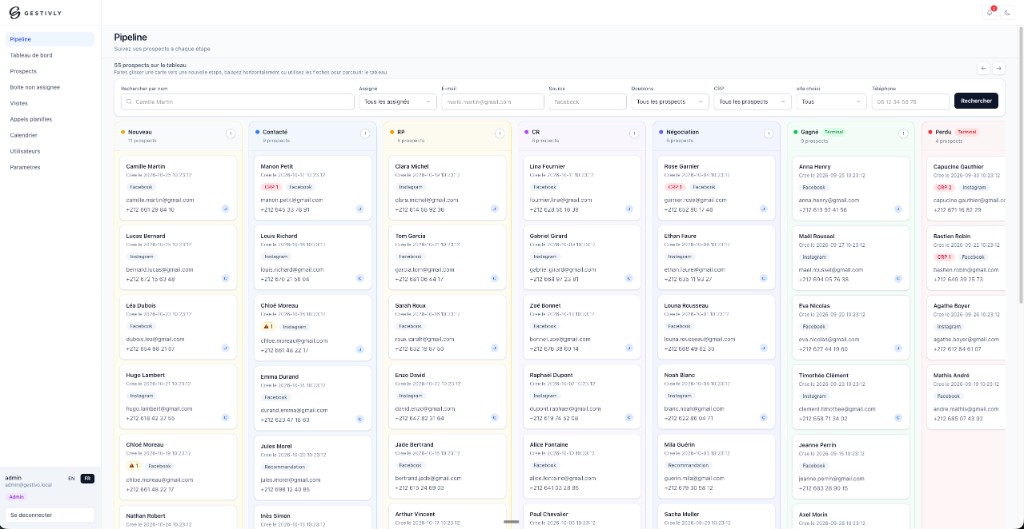
A duplicate is flagged, and you can see why
Detection compares email, phone, and name, including close name matches. The signal sits on the card. The reason sits on the profile.
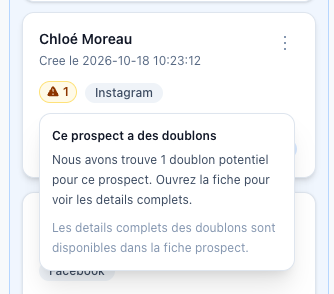
On the card
A warning says this prospect already has a match. Open the profile to see which one.
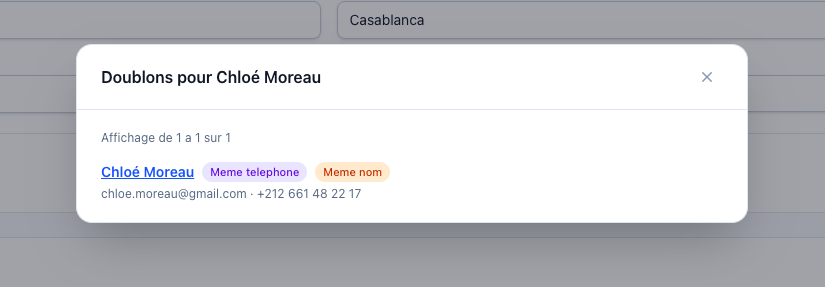
On the profile
Gestivly shows what matches: the same phone, the same name, or both. The other record’s details are on the same line.
- Search and filter by stage, source, assignee, duplicates, no-answer, and custom fields.
- Each profile keeps contact details, address, city, optional square meters, notes, and the original Facebook form answers.
- Custom fields can be text, number, or dropdown. Fields can be required, and you can filter on them.
- Several people can own a lead. An unassigned inbox holds leads that still need an owner.
- No-answer tracking counts each unanswered attempt, with a history of who logged it and when.
- Roles are admin, manager, sales, call centre, and read-only data viewer.